Introduction#
About This Manual#
This document is an installation guide for Utsusemi ([InstRef.1]), a general-purpose data reduction and analysis environment used at neutron scattering instruments in the Materials and Life Science Experimental Facility (MLF) of J-PARC. It explains how to install Utsusemi on a computer and prepare a working environment for neutron data processing.
Basic operation and data analysis procedures are not covered in this document. Please refer to the Utsusemi User Manual, which is provided separately, for detailed usage instructions.
Because operating systems and software environments continue to evolve, the information contained in this manual is subject to change. The latest installation information can always be found on the Utsusemi Portal Site ([InstRef.2]).
Utsusemi Portal Site
Installation Overview#
Utsusemi can be installed using one of two approaches:
Installation from a prebuilt binary package
Building from source code
At the time of writing, the following installation methods are available.
Binary Package Installation#
Ubuntu Linux#
Prebuilt binary packages are available for:
Ubuntu 24.04
Ubuntu 22.04
Linux Mint 22 (Ubuntu-compatible)
Linux Mint 21 (Ubuntu-compatible)
Microsoft Windows#
A dedicated Windows binary installer is available (Windows 11 Only).
macOS#
A dedicated macOS binary installer is available.
Building from Source Code#
Source-code installation using automated build scripts is supported for the following operating systems:
Ubuntu Linux#
Verified on:
Ubuntu 24.04
Ubuntu 22.04
Red Hat Compatible Linux#
Verified on:
AlmaLinux 9.x
AlmaLinux 8.x
The following chapters describe each installation method separately and provide detailed instructions for configuring a Utsusemi environment on each supported platform.
Overview of Utsusemi#
Utsusemi is a suite of software tools for data reduction, visualization, and correction of event data produced by the MLF components of the DAQ Middleware ([InstRef.3]) used at J-PARC MLF. It is built on top of the Manyo Library ([InstRef.4]), the data-analysis framework under development at MLF, and provides flexible histogramming capabilities as well as advanced event filtering based on instrument status and sample-environment information.
Another major objective of the project is the practical deployment of Live Data Reduction at MLF, enabling users to analyze neutron-scattering data safely and efficiently during experiments.
Utsusemi has already been adopted on many instruments and currently serves as one of the primary software frameworks for neutron-scattering data analysis at MLF.
The following sections provide an overview of the software covered by this installation manual.
What Can Utsusemi Do?#
At many instruments in MLF, neutrons generated by a spallation neutron source are irradiated onto a sample. The scattered neutrons are then detected and recorded by detector systems. In neutron-scattering experiments, it is necessary to determine both the scattering direction and the neutron energy. The scattering direction is obtained from detector position information, while neutron energy is determined using the Time-of-Flight (TOF) method.
The detected neutron events are stored as event records containing position and timing information. The primary purpose of Utsusemi is to process these event datasets flexibly and efficiently to extract information about the sample, such as atomic and molecular structures, excitations, and dynamical behavior.
Utsusemi also provides various visualization and data-correction utilities.
Software Architecture#
Utsusemi is built upon the Manyo Library, the standard data-processing framework used within MLF. The core of the Manyo Library is implemented in C, while Python is used as the primary user interface layer. As a result, users can invoke Manyo functions directly from Python scripts.
Similarly, Utsusemi provides numerous application-specific functions, most of which are accessible from Python. Since the low-level C functions are intentionally primitive, end users generally interact with higher-level wrapper functions (facade functions) that provide a more convenient interface.
To simplify analysis workflows, Utsusemi also provides software for constructing and executing command sequences using these facade functions. In addition, graphical applications are available for data visualization.
A portion of the general-purpose visualization software originally included in Utsusemi has since been separated into an independent module named uGao. Consequently, many Utsusemi applications depend on uGao for visualization functions.
In a broader sense, the complete Utsusemi ecosystem consists of the following three major software components:
Manyo Library
uGao
Utsusemi
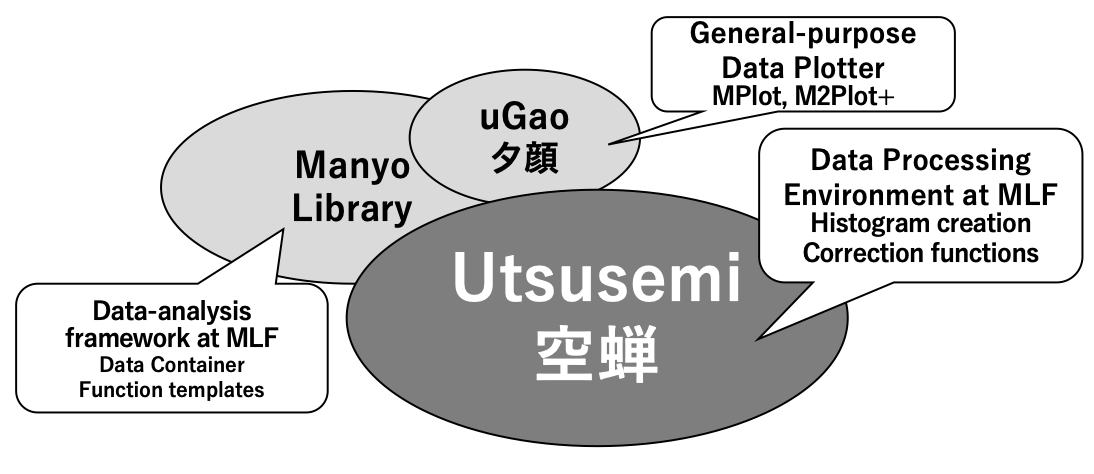
Overall Architecture of the Utsusemi Software Ecosystem#
Functional Components#
Utsusemi provides the following categories of functionality:
Data Processing#
Core Python functions available within the Utsusemi environment
Facade functions that simplify common analysis operations
Command-sequence execution software for creating and running analysis workflows
Visualization#
General-Purpose Visualization Tools#
uGao MPlot
uGao M2Plot+
DetectMap
Inelastic Scattering Visualization Tools#
VisualContM
D4Mat2Slicer
D4MatSlicer
System Requirements#
Utsusemi requires a 64-bit Python environment and supports only the operating systems listed below.
OS |
Architecture |
ディストリビューションなど |
|---|---|---|
Linux |
x86_64, arm64 |
Ubuntu 24.04, 22.04 / AlmaLinux 9, 8. |
Windows |
x86_64 |
Windows 11 |
macOS |
Apple Silicon |
26(Tahoe), 15(Sequoia), 14(Sonoma) |
Hardware Requirements#
The computer used for installation should provide at least:
8 GB of memory (minimum)
1 GB of available storage space
For routine data processing, approximately 0.5 GB of memory is required for a typical beamline run. Processing multiple runs simultaneously generally requires memory proportional to the number of datasets being analyzed.
Certain multidimensional analysis applications, such as D4Mat2, require a substantially larger amount of memory and should be operated on systems with at least:
32 GB RAM
Major Features#
Event Data Histogramming#
Histogram generation from MLF event data
Direct processing of event data produced by DAQ Middleware
Supported histogram axes:
TOF (Time of Flight)
Wavelength (λ)
Momentum transfer (Q)
Energy
Energy Transfer
d-spacing
Event Filtering#
Time-resolved data analysis
Event classification using external TTL signals
Sequence-Based Workflow Execution#
General-purpose workflow editor (SequenceEditor)
Command-line execution of analysis scripts
Visualization#
Using the uGao visualization framework:
One-dimensional plotting (MPlot)
Two-dimensional plotting (M2Plot+)
Detector-map visualization (DetectMap)
Neutron-Scattering Analysis Tools#
Detector-efficiency correction
Solid-angle correction
Normalization
Inelastic-scattering corrections (e.g., ki/kf correction)
Advanced Visualization#
Visualization of single-crystal inelastic-scattering data (VisualContM)
Visualization of multidimensional single-crystal datasets (D4MatSlicer, D4Mat2Slicer)
Supported DAQ Electronics Modules#
Signals from different detector systems are collected through dedicated DAQ electronics modules and converted into event data by DAQ Middleware. Since event formats differ slightly among hardware modules, Utsusemi provides support for the following module types.
Supported Detector Readout Modules#
Detector Type |
Module name |
Description |
|---|---|---|
One-dimensional position-sensitive detector (PSD) |
NEUNET |
Readout module for 1D detector systems |
Neutron monitor |
GATENET |
Readout module for point detectors |
Generic external signals |
TrigNET |
Separates neutron events according to external trigger signals for independent analysis |
Gamma-ray detector |
APV8008 |
Gamma-ray detector readout module |
One or two dimensional scintillation counters |
Readout, ReadoutGate |
Readout modules supporting 2D detector systems (WLSF, MWPC, RPMT) |
Beamlines Using Utsusemi#
As of FY2022, Utsusemi has been deployed at the following MLF beamlines.
BL |
Name |
Code |
Usage |
|---|---|---|---|
BL01 |
4SEASONS |
SIK |
Utsusemi |
BL02 |
DNA |
DNA |
Utsusemi with DNA ext. |
BL10 |
Noboru |
NBR |
A part of Utsusemi |
BL11 |
PLANET |
HPN |
Utsusemi and HPN apps. |
BL14 |
AMATERAS |
AMR |
Utsusemi |
BL15 |
TAIKAN |
SAS |
Utsusemi with SAS ext. |
BL17 |
SHARAKU |
NVR |
Utsusemi |
BL19 |
TAKUMI |
ENG |
Utsusemi and ENG apps. |
BL21 |
NOVA |
NVA |
A part of Utsusemi |
Development Environment#
Item |
Description |
|---|---|
Programming Languages |
C++, Python 3 (currently Python 3.12) |
Primary Development Platform |
Linux (Ubuntu 24.04) |
External C/C++ Libraries |
Manyo Library environment (Boost, HDF5, NeXus, MiniXML, GSL) |
External Python Libraries |
numpy, scipy, matplotlib, PySide6 (Qt), pyqtgraph, and others |
Validation Platforms |
Ubuntu Linux 20.04-24.04, Linux Mint 22-23, Windows, macOS |
License#
Utsusemi is distributed under the terms of the GNU General Public License Version 3 (GPLv3) ([InstRef.5])
Obtaining Utsusemi#
The latest release of Utsusemi can be downloaded from the Utsusemi Portal Site:
References#
Development status of software ‘Utsusemi’ for Chopper Spectrometers at MLF, J-PARC. Y. Inamura, T. Nakatani, J. Suzuki, T. Otomo, J. Phys. Soc. Jpn. 2013, 82, SA031-1 - SA031-9
Development of a data acquisition sub-system using DAQ-Middleware K.Nakayoshi, Y.Yasu, E.Inoue, H.Sendai, M.Tanaka, S.Satoh, S.Muto, N.Kaneko, T.Otomo, T.Nakatani and T.Uchida, NIM-A, 600, 173-175, 2009.
Object-oriented data analysis framework for neutron scattering experiments J. Suzuki, T. Nakatani, T. Ohhara, Y. Inamura, M. Yonemura, T. Morishima, T. Aoyagi, A. Manabe, T. Otomo, Nuclear Inst. and Meth. Phys. Res. 2009, 600, 123.